
A notification lands on your phone: motion detected. You open it. It's a moth on the lens. Twenty minutes later, another one. This time it's headlights sweeping across the wall from a car turning in the street outside. By the third or fourth false alert of the night, most people do the same thing: they mute the app.
That is the actual failure mode of most camera security systems. Not that they miss the intruder, but that they cry wolf so often you stop listening before the intruder ever shows up.
Motion Detection Doesn't Know What Motion Is
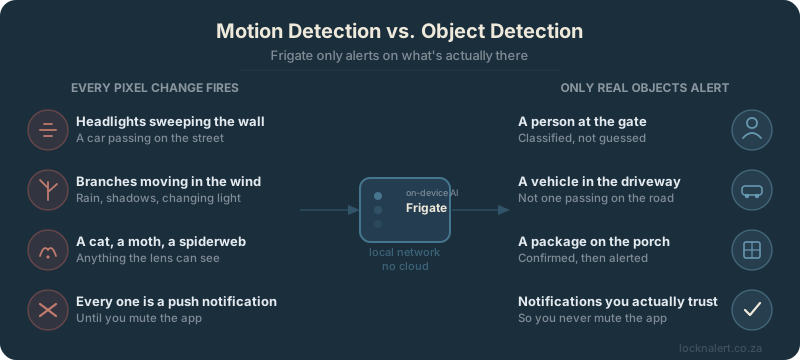
Most cameras, including most alarm systems with a camera bolted on, work on pixel-change detection. The software compares one frame to the next and asks a single, dumb question: did anything change? A branch swaying in the wind, changing light as clouds pass, rain on the lens, a cat crossing the driveway, your own curtains moving. All of it changes pixels. All of it counts as "motion."
The camera has no idea whether what moved was a person walking up your driveway or a shadow. It cannot tell the difference, because it was never asked to. It was only ever asked whether something changed.
Alert Fatigue Is a Security Problem, Not an Annoyance
Every false alert costs you something. Not much the first time. But after the tenth notification about a leaf, most people either turn off push alerts entirely or start ignoring them out of habit. The one night it actually matters, the notification that says someone is at the gate looks exactly like the hundred before it that were nothing. So it gets swiped away too.
A camera system that alerts constantly and a camera system with no alerts at all end up producing roughly the same outcome: nobody looks.
What Frigate Actually Does Differently
Frigate is free, open-source NVR (network video recorder) software that runs real object detection on your video streams, on your own hardware, before anything is ever labelled an "event." Instead of asking whether pixels changed, it asks what changed. It runs each frame through a trained model that classifies what it sees: a person, a car, a dog, a package, a cat.
Only once something is actually classified does Frigate raise an event. You can filter further, by zone (alert on the driveway, not the street beyond the fence) and by object type (a person at the gate matters, a cat on the lawn does not). The branch still sways. The headlights still sweep the wall. Frigate looks at both, decides neither is a person or a vehicle, and says nothing.
As How-To Geek covered when comparing Frigate to a Ring subscription, this all runs locally. No footage or detection data leaves your network. Hardware acceleration (a Coral TPU, for example) makes detection near-instant, but even modest hardware can run it. And because it's open-source, there's no monthly fee sitting between you and your own cameras, only the one-time cost of the hardware it runs on.
Where This Fits Into a Local Smart Home
This is the same principle LocknAlert applies everywhere else: run the intelligence on the device in your house, not in someone else's data centre. Your Paradox alarm's zones, your door contacts, your motion sensors, none of it needs to leave your network to be useful. Camera detection is no different. It just needed the right software.
Once Frigate is classifying what your cameras see, Home Assistant can act on it. A person detected at the gate after the alarm is armed is a very different event from a person detected at the gate while everyone is home. If you're also running LocknAlert Bridge, you can combine both signals: a Paradox zone triggering and Frigate confirming a person in that same area is a far higher-confidence alert than either one alone.
Running Frigate Without Building It Yourself
Setting up Frigate from scratch means picking hardware, wiring up storage, configuring detection zones, and getting a Coral TPU or GPU passthrough working correctly. It's approachable if you enjoy that kind of project, but it's also exactly the kind of setup most people buy a security system to avoid doing themselves.
Home Hub Secure+ is a Home Assistant appliance with dedicated AI acceleration hardware built in, pre-configured to run Frigate out of the box. Connect up to six cameras, and it starts classifying people, vehicles, and events on-device from the moment you plug it in. No cloud upload, no subscription, no separate box to configure.
Stop Getting Alerts About Nothing
Home Hub Secure+ runs Frigate's on-device object detection out of the box. Real alerts for real events, no cloud, no monthly fees.