
You get halfway to work and the thought hits: did I arm the alarm? So you either turn around, or you spend the day convincing yourself it's fine, it's probably fine.
Or you come home after a long day, hands full of shopping, and have thirty seconds to get to the keypad before the siren goes off. Every single time.
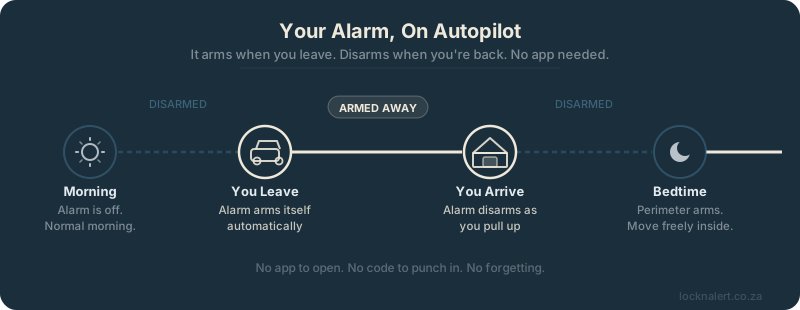
Both of these problems are completely solved once your Paradox alarm is connected to Home Assistant. Your alarm can arm itself the moment the last person leaves your home, and disarm itself the moment you arrive back. No app to open. No codes to punch in at the door. No forgetting.
This article covers exactly how that works and what you need to set it up.
What Makes This Possible
There are two pieces that need to work together: Home Assistant needs to know where you are, and it needs to be able to control your alarm.
Home Assistant handles the first part natively. It keeps track of where everyone in your household is, using the free Home Assistant app on their phones. When your phone connects to your home Wi-Fi, Home Assistant marks you as home almost instantly. When you leave and your GPS shows you somewhere else, you are marked as away.
For the second part — actually controlling your Paradox alarm — that is what LocknAlert Bridge does. It connects directly to your panel's serial port and exposes every zone, arm state, and control function to Home Assistant over your local network. No cloud. No subscription. No latency from a remote server.
Once both pieces are in place, you write a small automation in Home Assistant that says: when the last person leaves home, arm the alarm in Away mode. When someone arrives home, disarm it. That is the whole thing.
How Presence Detection Actually Works
A lot of people have tried geofencing automations before and found them unreliable — phone GPS is slow, the geofence radius is wrong, the automation fires at 2am for no obvious reason. Home Assistant's approach is more robust because it combines multiple signals rather than relying on any one of them.
The Home Assistant Companion app (free, on Android and iOS) sends location updates using:
- Home Wi-Fi — the moment your phone connects to your home Wi-Fi, Home Assistant marks you as home immediately. This is the fastest and most reliable signal for arriving home.
- GPS location — a zone around your home address. Useful for detecting when you have left the area.
- Bluetooth — if you have a Bluetooth hub at home, Home Assistant can pick up your phone even before it connects to Wi-Fi.
In practice, arriving home is near-instant. Your phone hits the Wi-Fi and within a few seconds HA knows you are home. Leaving home detection is slightly slower — typically 30 seconds to a couple of minutes depending on GPS lock — but for arming the alarm that is perfectly acceptable. The alarm should arm after you leave, not while you are still walking out the door.
The Three Automations Worth Setting Up
1. Arm in Away Mode When Everyone Leaves
This is the main one. The trigger is: everyone in your household is away at the same time. The action is: arm the alarm in Away mode.
The "all persons away" condition is important. You do not want the alarm arming while your partner is still at home just because you left first. You simply create a household group in Home Assistant and trigger on the whole group being away — not just one person.
It is also worth adding a small delay — five minutes works well — between everyone leaving and the alarm arming. This gives time to realise you forgot something and come back without the alarm triggering on re-entry.
2. Disarm When You Arrive Home
The trigger here is: anyone in your household arrives home. The action: disarm the alarm.
Add a condition to this automation: only disarm if the alarm is currently armed in Away mode. You do not want the alarm disarming if it has been triggered or if it is in Stay/Night mode.
Because LocknAlert Bridge exposes the full alarm state to Home Assistant — armed away, armed stay, triggered, disarmed — you can make this condition precise. If the alarm is armed away and you arrive home, disarm it. Any other state, leave it alone.
3. Arm in Stay Mode at Bedtime
This one is optional but popular. Set a time-based automation — say 10:30pm — that arms the alarm in Stay mode (perimeter only) if everyone is already home. Interior zones stay off so you can move around the house freely. Exterior doors and windows are armed.
Combined with the "disarm on first person waking up" or a simple morning time trigger that disarms it, you end up with a fully hands-off alarm schedule for sleeping hours too.
What You Actually Need
To set all of this up you need three things:
- A Paradox alarm panel — Magellan (MG), Spectra (SP), or EVO series
- LocknAlert Bridge — connects your panel to Home Assistant locally over your network. One-time purchase, no ongoing fees.
- Home Assistant — running on any device on your local network. A Raspberry Pi 4, an old mini-PC, or LocknAlert's own Home Hub which comes pre-configured.
Once set up, your alarm appears in Home Assistant as a standard alarm panel. It works with all of Home Assistant's built-in automation tools — no scripting needed. You can build all the automations in the point-and-click visual editor.
Check the compatibility page to confirm your specific panel model and firmware are supported.
A Note on Security
The most common concern people raise is: what if my phone's location is wrong and the alarm disarms when nobody is actually home?
It is a fair question. A few things mitigate it in practice:
- Wi-Fi arrival detection is very precise — it requires your phone to be physically on your home network, which means you are home.
- You can require two conditions to disarm: the person entity must be home and the front door contact sensor must open within the next two minutes. If the door does not open, the alarm stays armed. This uses the same door sensor your alarm already has wired in.
- The alarm itself still has its own keypad. If the automation fails for any reason, you can always disarm manually the traditional way. Nothing about this removes your fallback.
The automations also all run locally on your Home Assistant instance. They do not depend on anyone else's servers. If your internet connection goes down, presence detection based on home Wi-Fi still works — your phone connects to the router, the router tells HA, HA fires the automation. All of it stays on your local network.
This Is What "Smart Home" Actually Means
There is a version of smart home that means you have an app for every light bulb. That is not what this is.
The version worth building is one where the house responds to what you actually do — when you leave, when you arrive, when you go to bed — without you having to think about it or touch your phone. Your alarm is one of the most important systems in your home, and it is also one of the systems people interact with most badly. Forgotten arms. Code fumbling at the door. False alarms from rushing the entry delay.
Automating it does not make it less secure. It makes it more consistently secure, because it always happens, not just when you remember.
The sensor network was already wired into your walls. LocknAlert Bridge gives it a voice. This is just the next step: making it actually do something with what it knows.
Ready to Set This Up?
LocknAlert Bridge connects your Paradox alarm to Home Assistant in minutes. One purchase, no subscription, works locally forever.